, , ,

How to Install VPN on Windows Server 2012 R2

2–3 minutes
30 comments on How to Install VPN on Windows Server 2012 R2
Getting Started Wizard

This post shows you how you can install a VPN Server on Windows Server 2012 R2 Step-by-Step. It shows you how you can easily setup a VPN server fro a small environment or for a hosted server scenario.

This is definitely not a guide for an enterprise deployment, if you are thinking about a enterprise deployment you should definitely have a look at Direct Access.

I already did a similar post on Windows Server 2008 R2 and Windows Server 2012.

First install the “Remote Access” via Server Manager or Windows PowerShell.
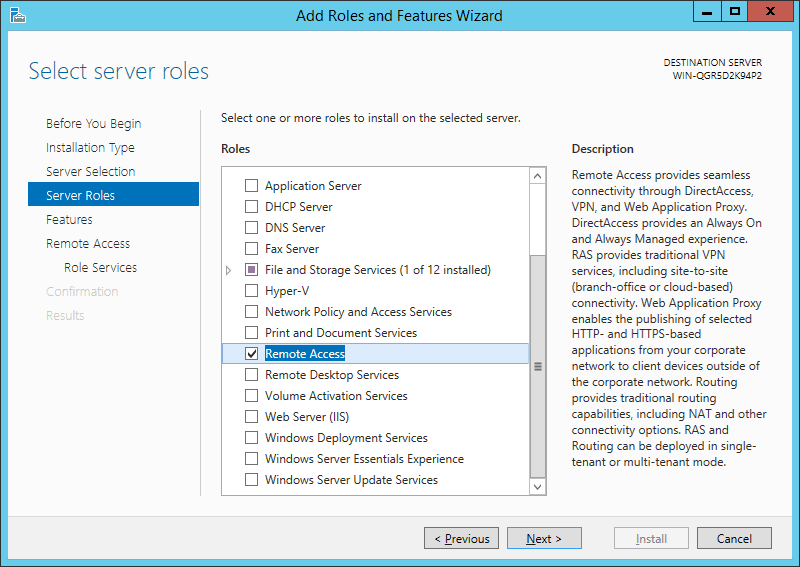
Remote Access

Select the “DirectAccess and VPN (RAS)” role services.
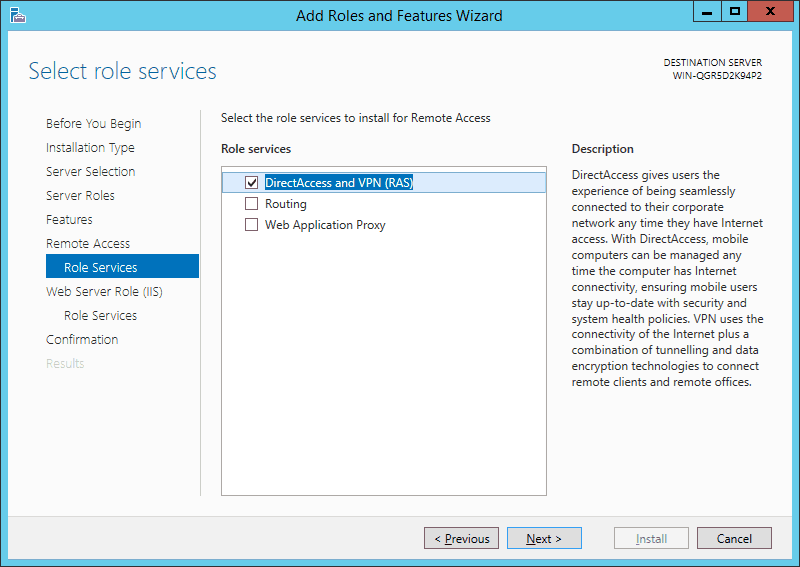
DirectAccess and VPN (RAS)

On the next steps just use the default settings. After that you can have a look at the Overview screen and install the role.
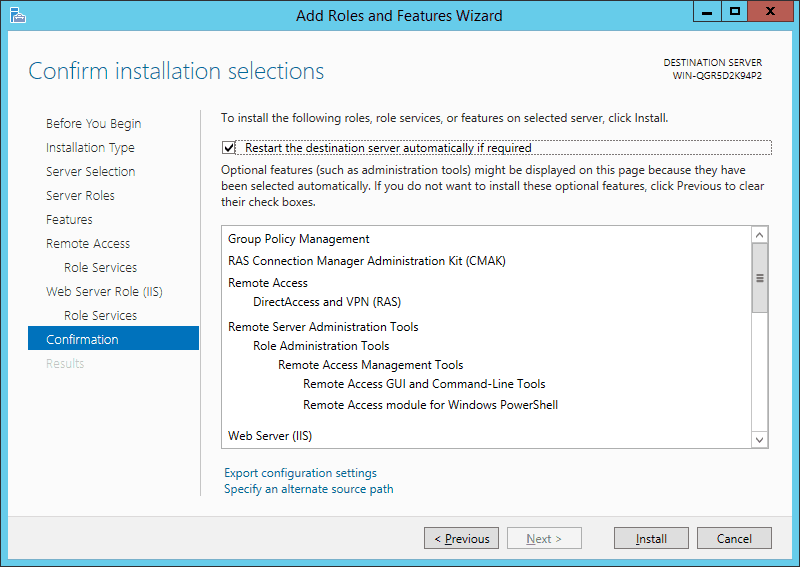
Remote Access Installtion Confirmation

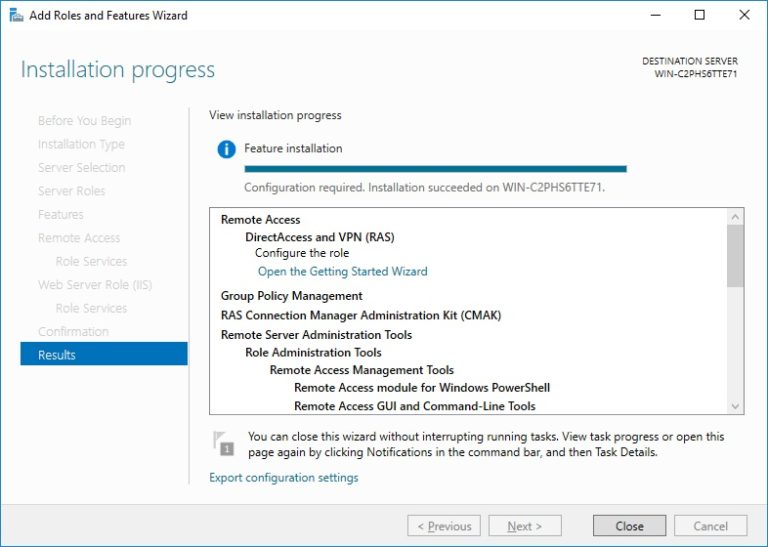
After the features are installed, which can take a while to finish you see the link for the Getting Started Wizard. Click on “Open the Getting Started Wizard“.
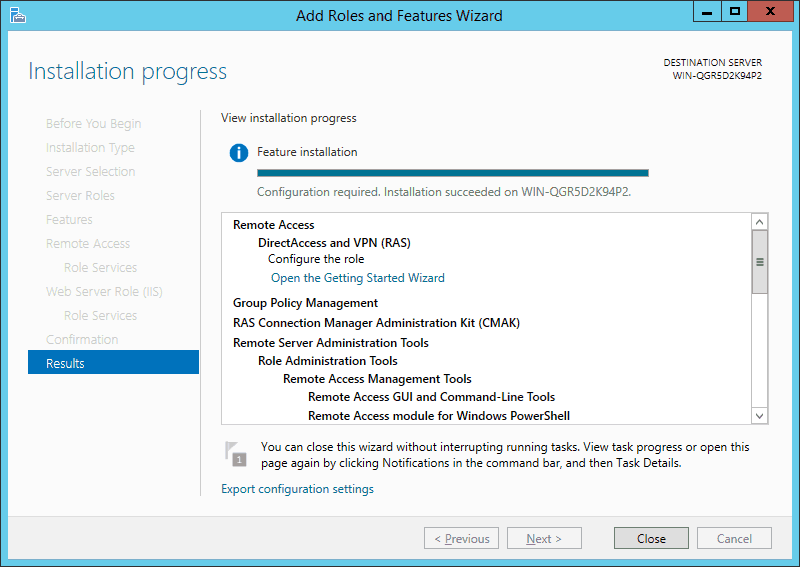
Getting Started Wizard

This opens a new wizard which will help you to configure the server. On the first screen select “Deploy VPN only“.
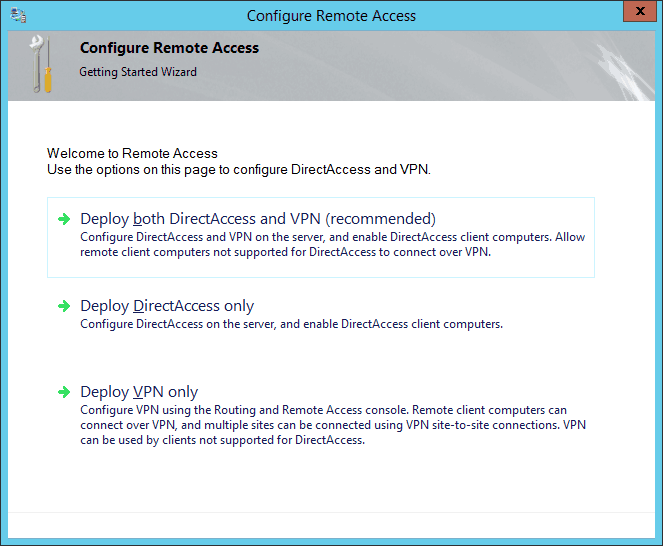
Deploy VPN

This opens the Routing and Remote Access MMC
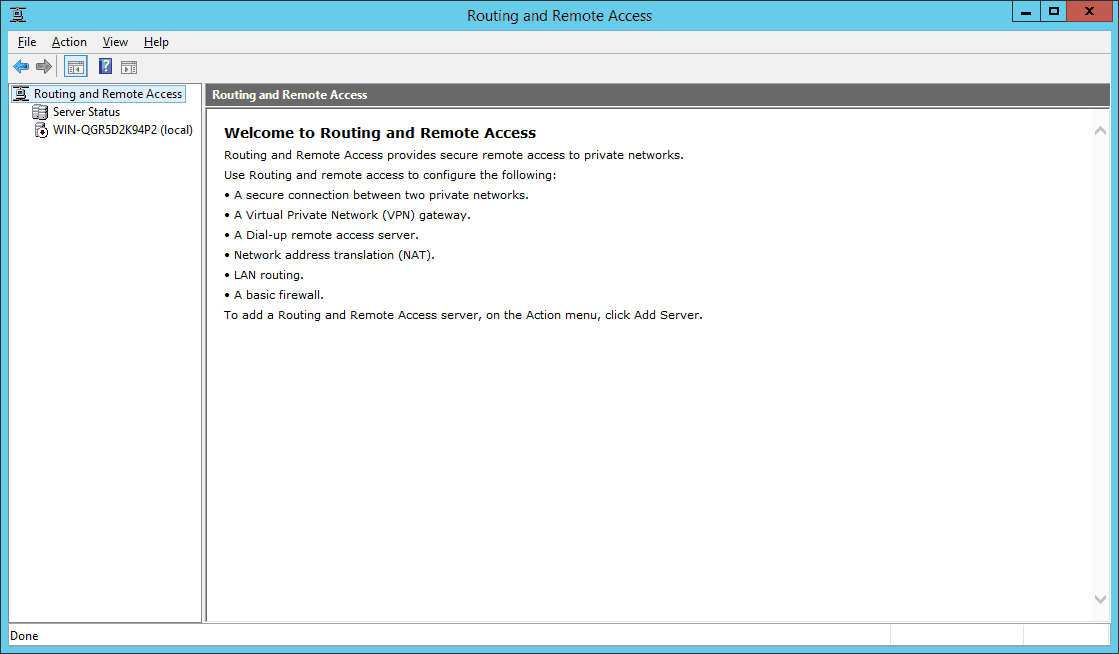
Routing and Remote Access MMC

Right click on the Server name and click on “Configure and Enable Routing and Remote Access“.
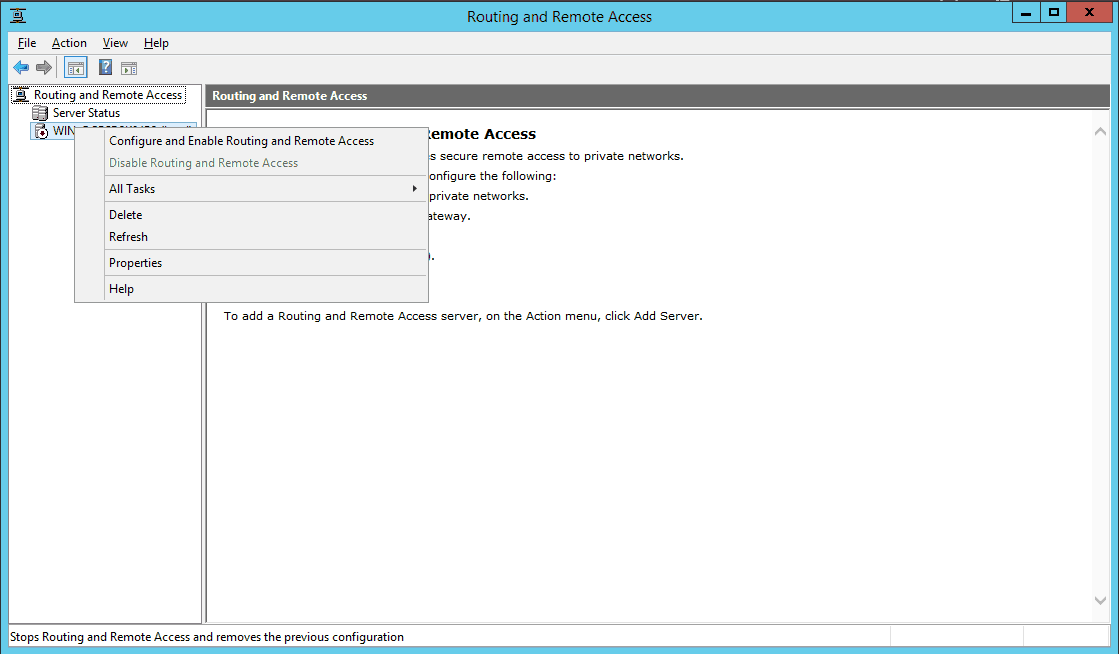
Configure and Enable Routing and Remote Access

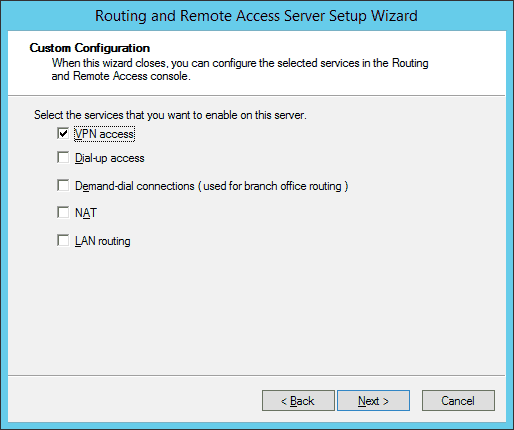
On the new wizard select “Custom configuration“.
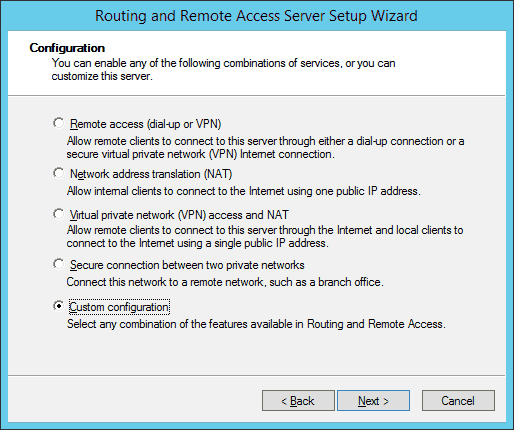
Custom VPN Configuration

Select “VPN Access“.

VPN Access

After you have click finish you can now start the Routing and Remote Access service.
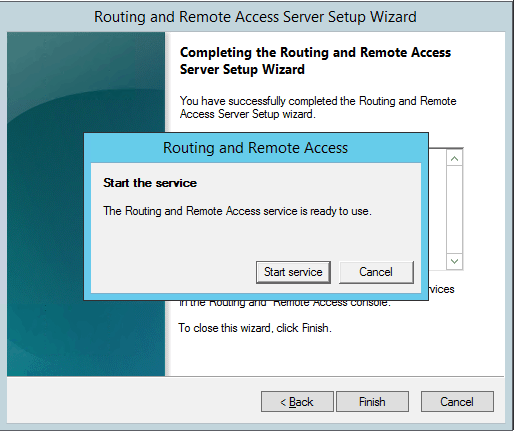
Start Rotuing adn Remote Access Service

If you have an other firewall between the internet and your Windows Server you have to open the following Firewall port sand forward them to your Windows Server:

For PPTP: 1723 TCP and Protocol 47 GRE (also known as PPTP Pass-through)
For L2TP over IPSEC: 1701 TCP and 500 UDP
For SSTP: 443 TCP

After the installation Users have to be enabled for Remote Access to connect to your VPN Server. On a standalone server this can be done in the Computer Management MMC, in a domain environment this can be done in the user properties of an Active Directory user.
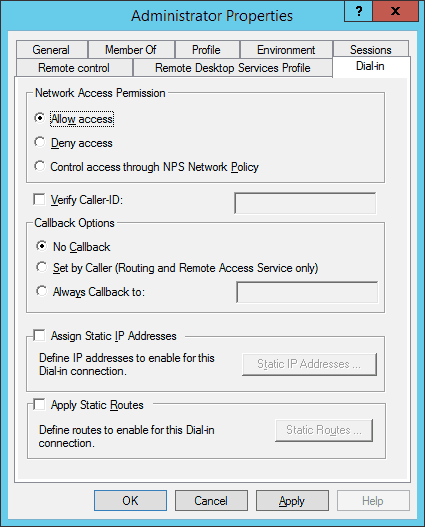
Allow Remote VPN Access for User

If you don’t have a DHCP Server in your environment you have to add a static IP address pool. This is often needed if you have a single server hosted at a service provider. In the properties of your VPN server you can click on the IPv4 tab and enable and configure the “Static address pool”.
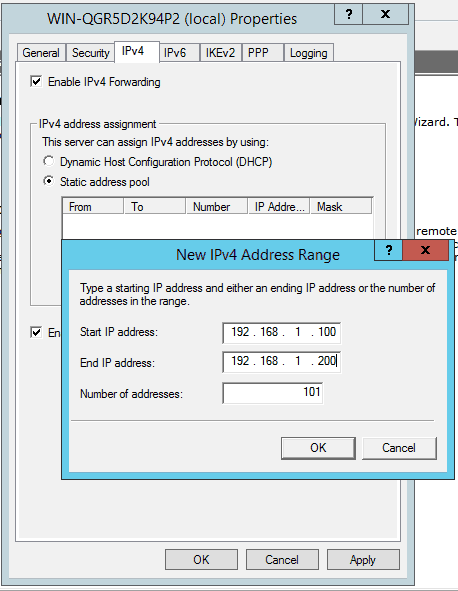
static address pool

You now have to add a IP address from the same subnet as your static address pool to the network interface of your server, so users can access the server.

I hope this helps you to setup a VPN server in a small environment, lab or hosted server.

30 responses

  1. Claudio Hitz Avatar
    Claudio Hitz

    Thanks for that great instruction!

  2. Tytans64 Avatar
    Tytans64

    Hello,
    I get an error during the wizard that asks “select network topology server”
    I select “with a single network adapter” and I enter the public IP address.
    I’m following and I get an error: “Internal network card with a valid IP address, DNS settings and domain profile not found”
    Note that I have no internet connection.
    Any idea?
    thank you

  3. Deepak Avatar
    Deepak

    excellent work,

  4. Beckbao Avatar
    Beckbao

    I build success! But don’t link up the net

  5. wilson chua Avatar

    Thanks for this great tip! I just add that if the user on the remote side doesnt want to lose connectivity to their regular ISP, the can go into the connection properties/TCP/IP,/properties/advanced/ and uncheck the “use default gateway on remote network”

  6. Robert A. Ober Avatar

    Hello,

    Does this work on 2012 R2 Essentials? I cannot get Web Access to work through a Linux firewall so I am looking at alternatives. Old style RDP does work for administrator through the Linux firewall, been doing that for years. Unfortuneatly Essentials cannot be licensed for normal users to use RDP.

    Thanks,
    Robert A. Ober

  7. Paddy Avatar

    Sali Thomas,

    google -> erste Seite -> DU ;)

    Guter Eintrag, Danke dafür!!

    lg Paddy

  8. BEN Avatar

    Hi Tomas,
    although i flagged restart if required, the installation fails because of “the server need to be restarted”.
    i already tried to install also from the powershell and also edited the default domain controllers policies, with no luck.
    Any suggestions?
    thank you in advance

    BEN

  9. Mohamed Avatar
    Mohamed

    i made perious steps , but error 800 , i think error appear due to portocol i dint adjut it, because i cant know the place which can adjut it,
    so please i need more clify about adjust firewall and pprtocol

    thx.

  10. Shakeer Ali Avatar
    Shakeer Ali

    i have done the same setup…. its working fine…

    i would like to do a new change on this setup…

    that i want remote users to connect via the vpn but their http and ftp access should not come to our corporate network..

    can anyone help on this.

  11. Lennart Sauter Avatar

    Thank you for the easy to follow tutorial. VPN up and working.

  12. Rangegate Avatar

    Ben, did you solve the problem with restart? I have the same problem. Lab server installs OK, but customer server fails with the “…requires restart” issue. Lab server is a DC on 2003 SBS network, customer server on SBS 2003 network but FSMO roles have been transferred to 2012 R2 server and it is OK otherwise. Trying to get VPN set up before demoting and removing the SBS server. Lab 2012 R2 does not have roles transferred. Don’t know if that is a factor, but is a difference.

  13. Imre Avatar

    One question: VPN settings are correct, it is working.
    I have an oracle server on port 9999, I want to enable it only inthat case, when VPN connection is active. So it means, I do not want toenable to connect on this port to anybody else, but if a user is connected via VPN? then it should be enabled.
    How to configure this sitaution? Firewall and VPN

  14. Keensy Avatar
    Keensy

    great !! have you got a guide for connecting the VPN iv used my FQDN aslo log in on my network but should i be using a http:/ something ??? help would be much appreciated

  15. Franz-Georg Avatar
    Franz-Georg

    Dear Thomas Maurer,
    great article ! Please add how to enable VPN-Clients to reach corporate resource Servers.
    Yours – Franz-Georg

  16. Paul Avatar

    great work, but my vpn clients gets a default GW of 0.0.0.0 and i cant browse the internet, even if i specify using a proxy server thats on the same LAN as the RAS Server…

  17. AlexA Avatar

    I am setting up IKEv2 VPN in Windows Server 2012 R2.
    On windows firewall with Adv. Security inbound Rules (2 rules) ports UDP Port Number=500, UDP Port Number=4500 for local & remotes port and authorized users done.

    I am trying to connect my windows phone 8.1 VPN using IKEv2 (user name+password).
    I get an connection error: Verify that your network has the necessary ports open. Error code 809.
    How to ensure that VPN ports and protocols are not blocked by the firewall.
    Thanks

  18. borsa tahmin Avatar
    borsa tahmin

    thank you friend

  19. Rudi Avatar

    Thanks, helpful and brief. It´s working!

  20. Duraid Avatar

    Hello Dear.
    I have server with windows server 2008r2 and I did all the up points but when I try to put the pool IP
    From 192.168.1.100 to 192.168.1.200
    I stopped because if I add it I need just 3 user to enter to the server
    And what is the remotely pc settings the client pc who will enter to the server remotely
    And thanks for your help

  21. Jason Avatar

    I followed this exactly but I am getting an error, “The remote connection was denied because the user name and password combination you provided is not recognized, or the selected authentication protocol is not permitted on the remote access server.” I have tried the username with the domain specified and left blank (eg DOMAIN\user)

  22. Azeem Avatar

    I am facing the same issue that Jason has mentioned above. It was working fine initially but recently when I am connecting, this error occurs. Can you please guide?

    Thanks

  23. PhilK Avatar

    Jason, I had the same issue and finally found (at http://lifeonnetwork.com/vpn-connection-issue-in-windows-10/) that it was because Windows 10 did not use CHAP and MS-CHAP V2 protocol by default. Corrected by going into the network properties of the VPN link and, on the Security tab, check the “Allow these Ptotocols” then “Microsoft CHAP Version 2 (MS-CHAP v2)” gets automatically checked. Since then connectivity has been restored.

  24. Captain Avatar
    Captain

    PhilK: the trouble with using CHAP is that its security has been seriously broken for a long time. I’d love it my VPN would use EAP-CHAP2 (where the CHAP handshake occurs in an SSL tunnel) or whatever, but it always errors out when I do that. I can’t really tell what protocol my VPN server is using and it annoys me.

  25. Mohsen Avatar

    Hi
    I have a vps server with win server 2012 r2
    I do all of this step, but i dont khow how to forward firewall ports to server :(
    help me plz

  26. Farhan Fadil Avatar
    Farhan Fadil

    Thanks sir, its so helpful

  27. FlorianLG Avatar
    FlorianLG

    Hey,

    thanks for your how to, but I still have some problems.

    1. One client needs allways the same ip like 10.0.10.50
    2. this client should be able to access a special port on the server using vpn
    3. the server needs to access a special port on this client

    I have a VS with only one nic.

    Is this possible?

  28. David Tough Avatar
    David Tough

    When I get to the point of starting the Routing and Remote Access Service, it hangs on the Initializing phase. I had already opened the firewall ports for PPTP, L2TP. Any idea what would cause that?

  29. Durga Charan Ojha Avatar

    Reply to Philk
    The URL added is moved to this https://www.lifeonnetwork.com/windows/vpn-connection-issue-in-windows-10/
    that it was because Windows 10 did not use CHAP and MS-CHAP V2 protocol by default. Corrected by going into the network properties of the VPN link and, on the Security tab, check the “Allow these Ptotocols” then “Microsoft CHAP Version 2 (MS-CHAP v2)” gets automatically checked. Since then connectivity has been restored.

    Thanks

Leave a Reply

Your email address will not be published. Required fields are marked *

This site uses Akismet to reduce spam. Learn how your comment data is processed.