

This post should show you how to install a VPN Server on Windows Server 2012. This post covers a VPN server for a small environment or for a hosted server scenario. This post is note made for enterprise deployments. If you want to run a VPN solution in your enterprise you should definitely look at Direct Access which is much easier to deploy in Windows Server 2012 than in Windows Server 2008 R2.
For a VPN server on Windows Server 2008 R2 check this post: How to Install VPN on Windows Server 2008 R2
-
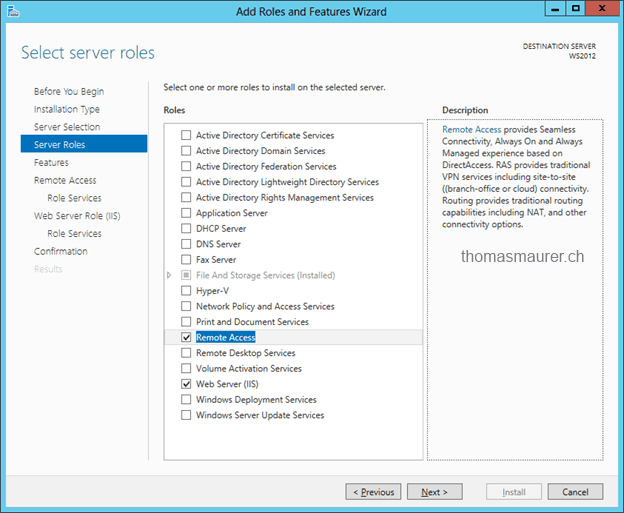
- Install the role “Remote Access” via Server Manager or PowerShell

- Install the role “Remote Access” via Server Manager or PowerShell
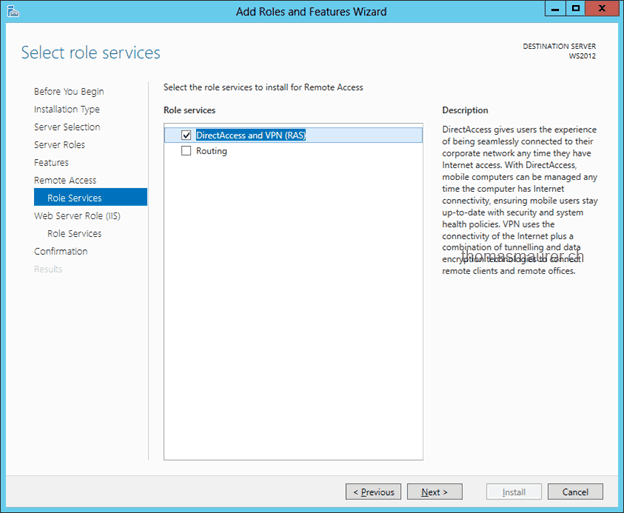
- Select the DirectAccess and VPN (RAS) role services
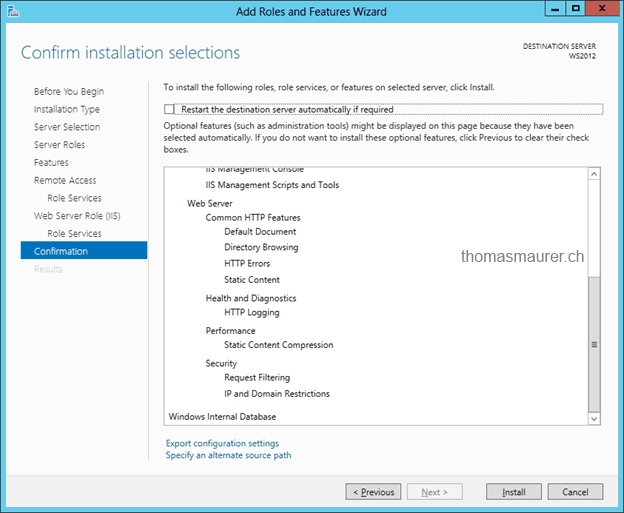
- The other selection in the wizard can use the default properties.
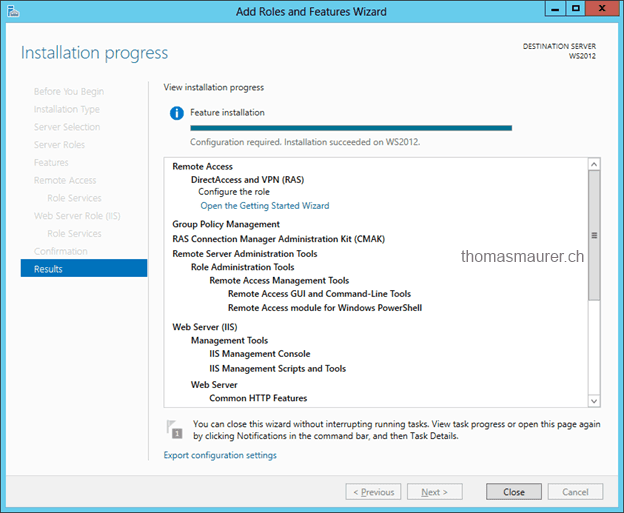
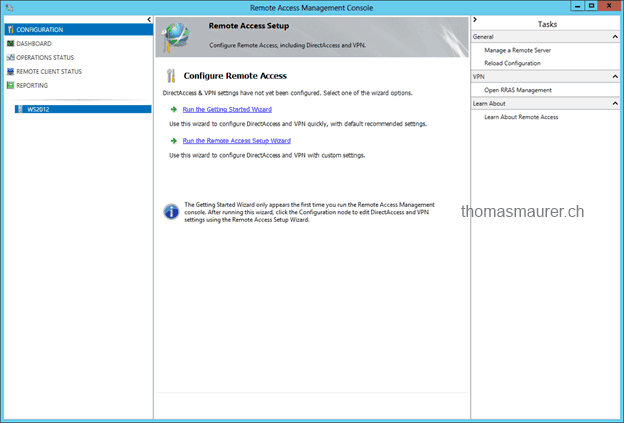
- After the features are installed you can us the Getting Started Wizard to configure the VPN scenario.
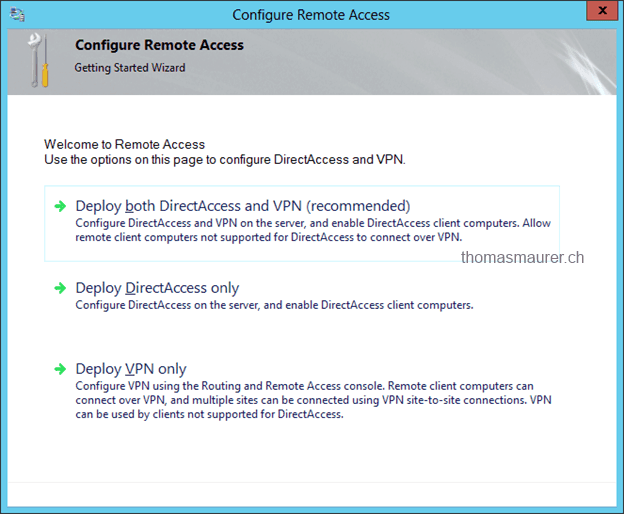
- If you don’t deploy DirectAccess choose Deploy VPN only.
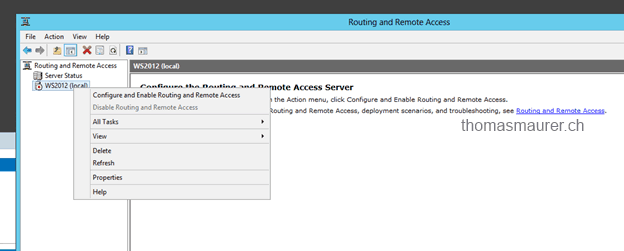
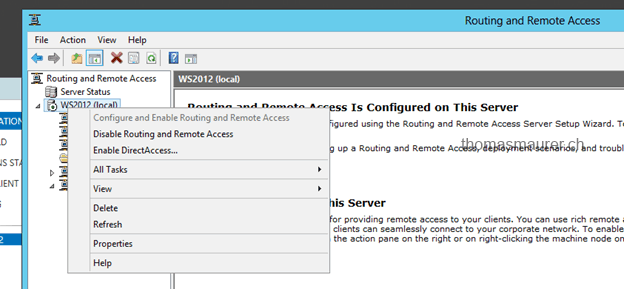
- This will open the Routing and Remote Access MMC. Right click on your server and choose Configure and Enable Routing and Remote Access.
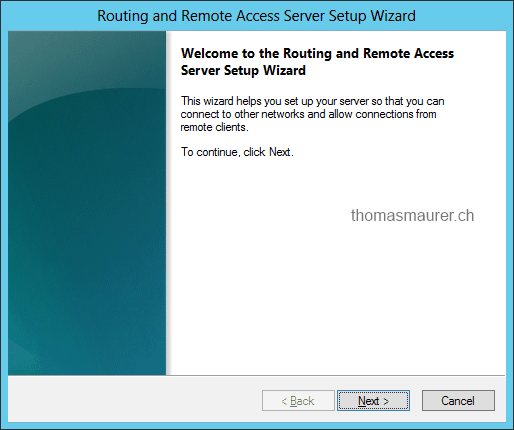
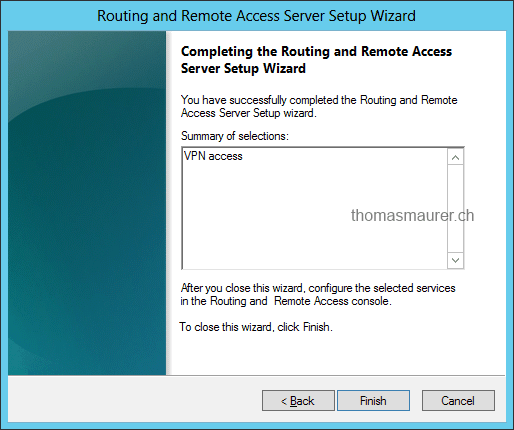
- This launches the Routing and Remote Access Server Setup Wizard
- If you have just a single network interface in your server choose Custom configuration
- Select VPN access
- And click finish and start service
- Now open the following ports on your firewall and forward them to your Windows Server
For PPTP: 1723 TCP and Protocol 47 GRE (also known as PPTP Pass-through
For L2TP over IPSEC: 1701 TCP and 500 UDP
For SSTP: 443 TCP - Users have to be enabled for Remote Access. On a standalone server this can be done in the Computer Management MMC, in a domain environment this can be done in the user properties of an Active Directory user.



Optional: If you don’t have a DHCP Server in your local network you have to add a static address pool. This can could be if you use a single server hosted by a hosting provider.
- Right click on your Remote Access Server and open properties
- Click on the IPv4 tab and select “Static address pool”
- Now add a IP address pool for example 192.168.1.100 – 192.168.1.200
- Now if this is a standalone server which has only a single Public IP address, add a secondary IP address to the server network interface which is in the same subnet as the IP address pool.

I also have other posts for about installing VPN on Windows Server:
- How to Install VPN on Windows Server 2008 R2
- How to Install VPN on Windows Server 2012 R2
- How to Install VPN on Windows Server 2016
- How to Install VPN on Windows Server 2019









i appreciate your guide
i wanted to try the setup but i’m behind a small router from my isp . my question is to configure the client do i need a public ip ?
i would appreciate to have the client config too
You can use a public IP or you can setup a Port-Forwarding via NAT. (see the ports in my post)
What are the pre-requisite when installing server 2012?
Hi, thanks for this article.
I have installed VPN by your example, but when the client is connecting to the server it ends with Verifying username and password.. In the server system event log I see: CoId={01181E8F-FC20-4A5B-8E91-17C4DB6E4073}: The user connected to port VPN3-127 has been disconnected because the authentication process did not complete within the required amount of time.
Do you have any idea what can be wrong?
thanks.
To Martin:
I had that same problem, so I installed NPS and reconfigure VPN and it works now.
@Thomas, I followed your contents, and failed to connect to the host. my client is win7, must i do some special setting on the client. thank you.
finally, it tells ‘Error 800: The remote connection was not made because the attempted VPN tunnels failed. The VPN server might be unreachable…’
1. Click Start and type in Active Directory users and Computers into the Quick Search then open it.
2. Navigate down to the account in question and open up its properties.
3. On the “Dial-in” tab check that under “Remote Access Permissions (Dial-in or VPN)” that “Allow Access” is selected. If it is not then change it and Apply the update.
On the client VPN connection
1. Right-click the VPN connection and click Properties.
2. Select the Security tab.
3. Under Type of VPN: select Point to Point Tunneling Protocol (PPTP).
4. Under Data encryption: select Optional encryption (connect even if no encryption).
5. Make sure Allow these protocols is selected
6. Check mark Microsoft CHAP Version 2 (MS-CHAP v2).
Finally retry the VPN Connection.
Hope it helps Grammy Leung
Hi All,
I could install ppptp on win 2012 and I could connect from clients, but I can’t ping tha LAN, neither can’t access the server. I have checked the NAP polices many many times. Do you have any ideas ?
Thx!
LKP, i’m having the same problem…WS2012 following instructions to start the RAS VPN-Only role…
i can connect to the VPN from a remote location, put i cannot ping or rdp anywhere on the network…
ports and services are triple checked..i’m hitting my head against the wall..:-(
Thank you for this article. I was missing the Network Access Permissions – Allow Access in the User properties.
My current issue is this. I’m connected to the remote server. However, I cannot map a drive on the server. It’s a 1 server VPN. Anyone have suggestions?
Thank you Tom, this helped me out.
this will work in azure ?
In Windows Azure you can use a build in Gateway to do VPN with your on premise network
Hi stat, Have you had solution ? I haven’t find yet :(
Hi
Just noticed this post is word for word with http://XXXXX
Clearly yours was posted first. Really sad to see people copy others work.
Keep up the good work
In the name of God
I hope good luck
I had a question
How do I setup my domain vpn in Windows Server 2008
What do settings in Windows 7
Thanks
VPN works as expected but to secure the server I want to change the network profile from public to private but this can’t be done on Windows Server 2012??? Do you have an answer?
The answer is: Force the private network profile by setting the local security policy under network lists manager rules for RAS (Dial In) Interface properties -> networkaddress -> location type -> from unconfigured to private
hi thanx for the tut i like your header can i save it
Is it possible to Manage Hyper-V Free with Windows 2012 Essentials? I know that there is no Hyper-V in Essentials, but can you manage with it? Great website you have here! Have a great week!
I configure VPN successfully, But when I connect with my VPN, I can not browse Internet. What can i do?
Browse the Internet not works. How I can change it?
I think this is a DNS or Routing Problem
Jewel,
On the Network you are connecting to, is it part of a domain or workgroup? On the client side computer in the properties you need to make sure you have the correct DNS settings to use. If it is using a DNS server in the domain put the correct DNS server in on the client computer vpn connection.
Under Advanced in the TCP/IP v4 settings you can uncheck the box to use the remote gateway. This will allow you to use the gateway of the local network you are on for the internet.
Now if this is a standalone server which has only a single Public IP address, add a secondary IP address to the server network interface which is in the same subnet as the IP address pool.
——————————————–
Hello , my server is a standalone and single public ip address,
How can I add a secondary IP address to the server network interface ?
Would you please help ,thank you
Well on the NIC configuration in the advanced configuration you can add other IP addresses
Any ideas on how to do a site to site VPN?
UDP 1701, not TCP bro…
Did you really try did? PPTP doesn’t work on Azure no matter how you configure. GRE 47 isn’t available. Users can’t modify that option, I guess.
This was not a VM running in Windows Azure, the VM was running on another hoster. I don’t think this will work in Windows Azure
I have configured the VPN server on WIN2012 as per the above guide . . but when we dial it from client machine following error generates. . Error806: the connection between your computer and VPN server couldn’t completed because VPN server is not configured to allowe GRE packet. Please help
wOot! I’ve been working on this on and off for a few weeks, probably have close to 5 hours of troubleshooting how to get my clients to connect to server shares over a vpn client. I had missed the last step; adding the IP address to the server’s single NIC to match the subnet IP from my static IP pool! Thanks so much for this information.
Okay. I followed this guide and I can connect to the server, but not all the time. I can connect over my Verizon phone (HTC Windows Phone 8) using the “Internet sharing” without any issues – which I could not do with when using the Cisco VPN Client. I was able to connect using a WiFi connection at an office about 45 miles from the server location – not that the distance matters much, but just for reference. I am not sure how to determine why sometimes I can connect, but other times I cannot. I am a software developer by trade, but this is my first stab at setting up my own server – which mostly hosts VMs for different development environments. The server has multiple NICs – one is outward facing with a WAN static IP address and the other is inward facing with a LAN static IP address. The server is a monster resource wise (Dual 8-core Intel Xeon Processors, 128 GB of memory, and a 500 GB SSD), so that should not be an issue. Anything you can recommend to assist me with debugging would be extremely helpful. I thought that once I got a successful connection, I should be able to connect from then on, but from one location, I keep getting a 789 error and I cannot seem top locate any issues on the server.
I forgot to include this. I have configured both a PPTP connection and a L2TP connection – both of which have been previously successful. I used the PPTP connection earlier today over my Verizon Wireless MiFi, but I cannot seem to connect at all, either connection, from behind a Verizon FiOS WiFi connection.
hi JEWEL AHMMED can not browse internet ,you can do this
vpn →property→network→double click tcp/ipv4→advanced→donet select the first one;
I followed the exact same steps and installed VPN on Windows 2012 Serer. I am trying to connect from Windows 7 to windows 2012 server on Amazon Cloud and getting the below error.
Error 720: A connection to the remote computer could not be established. You might need to change the network settings for this connection.
Any help is appreciated?
Thanks
i i have set up the vpn on mine server 2012 in the office, now am trying to access it at home, it says error connecting to vpn .ERROR 800, what am i doing wrong
Thanks for the post Thomas. Is there a way to do this -install role “Remote Access” via Powershell?
I tried numerous times to do so via Server manager and get a Failure – restart pending . However, nothing seems to be there. There is no update available or restart really pending. After restart and tried again it keeps failing. a DISM
you should be able to use PowerShell with the following command
Install-WindowsFeature RemoteAccess -IncludeAllSubFeature -IncludeManagementToolsHi all,
I just tried to configure Vpn on window server2012 via teamviewer remoteacces,during the course of configuration, server ask me to “click here to configure dhcp server”,when I clicked it, Iit keep me waiting for a while, then the server suddenly shut down,so I can’t continue to configure, may I know what caused this happen? and this will affect my other applications data were installed on my server2012?thanks
I configurating Vpn under workgroup,just thinking There is any ip conflic possibilities if I setup a ip range .because there is no shop and ad setup the win server 2012, appreciate your suggestions, thanks
Anthony
I configure VPN successfully, But when I connect with my VPN, I can not browse Internet. What can i do?
How can I install vpn on windows server 2012 with active directory.
How can I install vpn on windows server 2012 without active directory, I meant to say. Thanks
Is it possible to use the host’s gateway when you configure the VPN per this article?
When you set up the static IP range as suggested above (e.g 192.168.1.100 – 192.168.1.200), it does not allow you to set a gateway address. If I connect to the VPN server, the VPN settings on the client show an address in the range, but the gateway address is blank. I want to be able to connect to the Internet via the host’s gateway. This is on a machine with a single NIC with a public IP address.
Hello, this worked for a server on my client with W2012 Foundation with fixed IP.
Don’t know it it works on a server with Dynamic IP from ISP.
For everyone:
– open the specified ports on the ROUTER from your ISP
– go to active directory and select the user you want to useon VPN access, choose properties, choose dial-in tab and check ALLOW ACCESS
– and follow the rest of the tutorial. the points above were missing because for those who doesn’t understand very much of IT.
– On the client VPN connection (from Miguel):
1. Right-click the VPN connection and click Properties.
2. Select the Security tab.
3. Under Type of VPN: select Point to Point Tunneling Protocol (PPTP).
4. Under Data encryption: select Optional encryption (connect even if no encryption).
5. Make sure Allow these protocols is selected
6. Check mark Microsoft CHAP Version 2 (MS-CHAP v2).
– when asking for login use your domain/user <—– this user must have DIAL-IN checked !!!
My server 2012 is behind a cisco router which works as our dhcp server and connect all user to internet.
Can i setup VPN on server 2012 in this type of senerio pls help, how can i achieve this.
Hi,
I was following your guide but some of the images around steps 8&9 are missing so I just left things default.
The wizard finished successfully but then I was kicked off the RDP session and have been unable to log back in since. I cannot even ping the server in question.
Since it’s an AD server I can’t even just log in remotely – I’m going to have to reboot etc. to see what’s up but do you have any hints?
Dear Thomas,
Thanks for the sharing the same for us and it has great helped us.
Now I have installed and configure VPN on my server, and I need to use this network from outsite the office LAN (i.e home and another network), can you please help me out We have a cyberoam (CR50ING) firwall available and we are unable to findout the way.
Please help us, your help will be appreciate.
Hi there!
Is it possible to elaborate on this step?
“Now if this is a standalone server which has only a single Public IP address, add a secondary IP address to the server network interface which is in the same subnet as the IP address pool.”
I have that situation (not using DHCP, static IP addresses and single public IP address) and am able to connect through VPN, but the client then doesn’t have any internet access. ipconfig gives me this on the client:
IP Address. . . . . . . . . . . . : 192.168.16.16
Subnet Mask . . . . . . . . . . . : 255.255.255.255
Default Gateway . . . . . . . . . : 192.168.16.16
Which is a bit weird to have gateway and IP address the same if you ask me. So please elaborate on that step.
Thanks
Thank you!
I have the same issue as Martijn I cannot get internet access out. In control panel the dial in connect has no intenrnet access. I have same routing table issues the gate wau and ip address of the client are the same. The client is 192.168.1.8
Destination,Network mask,Gateway,Interface,Metric,Protocol
0.0.0.0,0.0.0.0,94.46.223.65,Ethernet,261,Network management
94.46.223.64,255.255.255.252,0.0.0.0,Ethernet,261,Local
94.46.223.66,255.255.255.255,0.0.0.0,Ethernet,261,Local
94.46.223.67,255.255.255.255,0.0.0.0,Ethernet,261,Local
127.0.0.0,255.0.0.0,127.0.0.1,Loopback,51,Local
127.0.0.1,255.255.255.255,127.0.0.1,Loopback,306,Local
192.168.1.0,255.255.255.0,0.0.0.0,Ethernet,261,Local
192.168.1.3,255.255.255.255,0.0.0.0,Ethernet,261,Local
192.168.1.7,255.255.255.255,0.0.0.0,Internal,286,Local
192.168.1.8,255.255.255.255,192.168.1.8,Internal,31,Network management
192.168.1.255,255.255.255.255,0.0.0.0,Ethernet,261,Local
224.0.0.0,240.0.0.0,0.0.0.0,Internal,286,Local
255.255.255.255,255.255.255.255,0.0.0.0,Internal,286,Local
hi I have done everything but when I try to connect my client from home router it do not connect with office server the connection shows “WAN miniport SSTP”. but when I connect same router that is connected with my server mean office router then it works fine.
Doesn’t work, followed all steps, it just throws stupid errors that mean nothing like ” the local comp0uter aborted the connection” or ” the selected authentication doesn’t work”