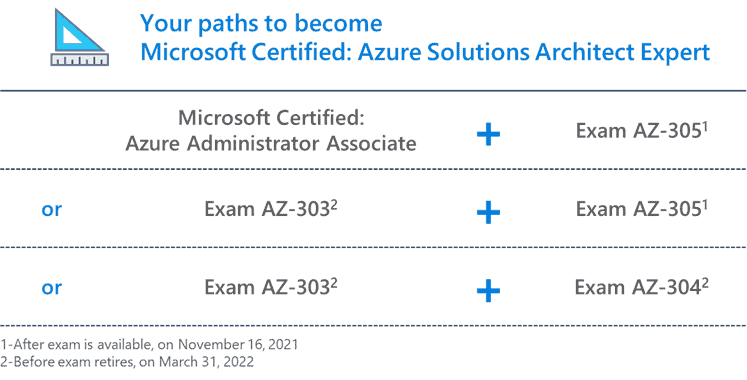
To get the Microsoft Certified: Azure Solutions Architect Expert certification, there are two new exams which you need to pass, the AZ-303: Microsoft Azure Architect Technologies and the AZ-304: Microsoft Azure Architect Design exam. In this blog post, I am going to share my AZ-303: Microsoft Azure Architect Technologies Certification Exam Study Guide with you. To learn and prepare for the exam, I usually use a couple of online resources, mainly Microsoft Docs and Microsoft Learn, which I am going to share with you. You can find more information about how I prepare for a Microsoft Certification exam on my blog post: How to prepare and pass Microsoft Certification Exam.
NOTE: Before starting with this exam, check out the new AZ-305 exam and my AZ-305 Microsoft Azure Solutions Architect Certification Exam Study Guide.
Also, check out other Microsoft Azure Certification Exam Study Guides:
- Exam AZ-900: Microsoft Azure Fundamentals Exam Study Guide
- Exam AZ-104: Microsoft Azure Administrator Exam Study Guide
- Exam AZ-204: Developing Solutions for Microsoft Azure Exam Study Guide
- Exam AZ-304: Microsoft Azure Architect Design Certification Exam Study Guide
- Exam AZ-500: Microsoft Azure Security Technologies Exam Study Guide
- Exam AZ-600: Configuring and Operating a Hybrid Cloud with Microsoft Azure Stack Hub Exam Study Guide
- Exam AZ-700: Microsoft Azure Network Engineer Exam Study Guide
- Exam SC-900: Microsoft Security, Compliance, and Identity Fundamentals Exam Study Guide
- Exam DP-300: Azure Database Administrator Exam Study Guide
Here is my AZ-303 Microsoft Azure Architect Technologies Certification Exam Study Guide
It is essential to get familiar with the exam objectives and skills measured first. That is why I recommend reading the description of the exam and the skills measured.
Exam AZ-303: Microsoft Azure Architect Technologies
Candidates for this exam are Azure Solutions Architects who advise stakeholders and translate business requirements into secure, scalable, and reliable solutions. Candidates should have advanced experience and knowledge of IT operations, including networking, virtualization, identity, security, business continuity, disaster recovery, data platform, budgeting, and governance. This role requires managing how decisions in each area affects an overall solution.
Candidates must have expert-level skills in Azure administration and have experience with Azure development processes and DevOps processes.
The high-level view of the skills measured in the exam:
- Implement and Monitor an Azure Infrastructure (50-55%)
- Implement Management and Security Solutions (25-30%)
- Implement Solutions for Apps (10-15%)
- Implement and Manage Data Platforms (10-15%)
You can find more information on the exam website.
Free Online Microsoft Learn AZ-303 Exam Study Guide resources
Microsoft Learn provides you with free online training and learning paths for different Microsoft technologies. They not just offer reading material, but also control questions and free online labs. Here are some relevant Microsoft Learn modules and learning paths for the AZ-303 Microsoft Azure Architect Technologies Certification Exam. Microsoft Learn is an important part of my AZ-303 exam study guide.
- Architect great solutions in Azure
- Architect network infrastructure in Azure
- Architect a data platform in Azure
- Architect storage infrastructure in Azure
- Architect compute infrastructure in Azure
- Architect infrastructure operations in Azure
- Architect migration, business continuity, and disaster recovery in Azure
- Architect modern applications in Azure
- Architect secure infrastructure in Azure
Microsoft Docs AZ-303 study guide resources
One thing I always used to prepare for my Microsoft exams is Microsoft Docs. Here are the relevant Microsoft Docs which I used to prepare and study for the AZ-303 exam.
Implement and Monitor an Azure Infrastructure (50-55%)
Implement cloud infrastructure monitoring
- monitor security
- monitor performance
- Create diagnostic setting to collect platform logs and metrics in Azure
- Create diagnostic setting in Azure using a Resource Manager template
- Metric Baseline – Get
- Azure Monitor overview
- Quickstart: Monitor an Azure resource with Azure Monitor
- Azure Monitor Workbooks
- Azure Monitor workbook visualizations
- Collect data from an Azure virtual machine with Azure Monitor
- monitor health and availability
- monitor cost
- configure advanced logging
- initiate automated responses by using Action Groups
- configure and manage advanced alerts
Implement storage accounts
- select storage account options based on a use case
- configure Azure Files and blob storage
- configure network access to the storage account
- implement Shared Access Signatures and access policies
- implement Azure AD authentication for storage
- manage access keys
- implement Azure storage replication
- implement Azure storage account failover
Implement VMs for Windows and Linux
- configure High Availability
- configure storage for VMs
- select virtual machine size
- implement Azure Dedicated Hosts
- deploy and configure scale sets
- configure Azure Disk Encryption
Automate deployment and configuration of resources
- save a deployment as an Azure Resource Manager template
- modify Azure Resource Manager template
- evaluate location of new resources
- configure a virtual disk template
- deploy from a template
- manage a template library
- create and execute an automation runbook
Implement virtual networking
- implement VNet to VNet connections
- implement VNet peering
Implement Azure Active Directory
- add custom domains
- configure Azure AD Identity Protection
- implement self-service password reset
- implement Conditional Access including MFA
- configure fraud alerts
- configure verification methods
- implement and manage guest accounts
- manage multiple directories
Implement and manage hybrid identities
- install and configure Azure AD Connect
- identity synchronization options
- configure and manage password sync and password writeback
- configure single sign-on
- configure Azure AD Connect cloud sync
- use Azure AD Connect Health
Implement Management and Security Solutions (25-30%)
Manage workloads in Azure
- migrate workloads using Azure Migrate
- implement Azure Backup for Azure workloads
- implement disaster recovery
- implement Azure Update Management
Implement load balancing and network security
- implement Azure Load Balancer
- implement an application gateway
- implement a Web Application Firewall
- implement Azure Firewall
- implement Azure Firewall Manager
- implement the Azure Front Door Service
- implement Azure Traffic Manager
- implement Network Security Groups and Application Security Groups
- implement Bastion
Implement and manage Azure governance solutions
- create and manage hierarchical structure that contains management groups, subscriptions and resource groups
- assign RBAC roles
- create a custom RBAC role
- configure access to Azure resources by assigning roles
- configure management access to Azure
- interpret effective permissions
- set up and perform an access review
- implement and configure an Azure Policy
- implement and configure an Azure Blueprint
Manage security for applications
- implement and configure KeyVault
- implement and configure Azure AD Managed Identities
- register and manage applications in Azure AD
Implement Solutions for Apps (10-15%)
Implement an application infrastructure
- create and configure Azure App Service
- create an App Service Web App for Containers
- create and configure an App Service plan
- configure an App Service
- configure networking for an App Service
- create and manage deployment slots
- implement Logic Apps
- Overview – What is Azure Logic Apps?
- Quickstart: Create your first workflow by using Azure Logic Apps – Azure portal
- Quickstart: Create automated tasks, processes, and workflows with Azure Logic Apps – Visual Studio
- Quickstart: Create and manage logic app workflow definitions by using Visual Studio Code
- implement Azure Functions
Implement container-based applications
- create a container image
- configure Azure Kubernetes Service
- publish and automate image management by using the Azure Container Registry
- publish a solution on an Azure Container Instance
Implement and Manage Data Platforms (10-15%)
Implement NoSQL databases
- configure storage account tables
- select appropriate CosmosDB APIs
- Choose the appropriate API for Azure Cosmos DB storage (Microsoft Learn module)
- Welcome to Azure Cosmos DB
- set up replicas in CosmosDB
Implement Azure SQL databases
- configure Azure SQL database settings
- implement Azure SQL Database managed instances
- configure HA for an Azure SQL database
- publish an Azure SQL database
Tips and Resources
I hope this AZ-303 Microsoft Azure Architect Technologies Certification Exam Study Guide helps you pass the exam and get the Azure Solutions Architect certification. I also recommend that you open a free Azure account if you don’t have one yet. You can create your free Azure account here. Also, check out my blog posts about Microsoft Azure Certification:
- Why you should become Microsoft Azure certified
- How to pick the right Azure exam certification path
- How to prepare and pass a Microsoft Azure exam
- Learn Microsoft Azure in 2020
- AZ-104 Microsoft Azure Administrator Exam Study Guide
I hope you enjoyed my AZ-303 Study Guide and it helps you as exam prep. Did I miss any link, or do you have any recommended AZ-303 Microsoft Azure Architect Technologies Certification Exam Study Guide resources? Let me know in the comments.