, , , , ,

Hyper-V over SMB: Set SMB Constrained Delegation via PowerShell

1–2 minutes
4 comments on Hyper-V over SMB: Set SMB Constrained Delegation via PowerShell
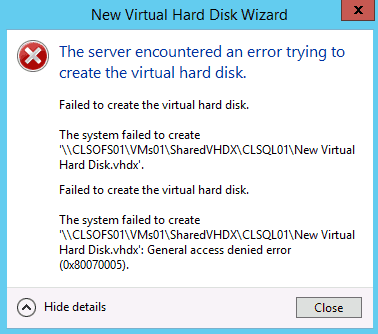
Hyper-V Gernal Access dinied error

When you are having configured a Hyper-V over SMB configuration, which means the virtual machines are running on Hyper-V host and are stored on a SMB file share, and you try to manage the virtual machine remotely from Hyper-V Manager or Failover Cluster Manager, you will run into access denied errors. The same error can also happen if you try live migrate the virtual machine. This error is caused because you are using the credentials from the machine which Hyper-V or Failover Cluster Manager is running on to access the file share via the Hyper-V host. This “double-hop” scenario is not by default not allowed because of security reasons. You can find more about Kerberos Authentication on TechNet.

To avoid this error you have to configure the SMB Constrained Delegation in Active Directory to allow this scenario for specific “double-hops”. In Windows Server 2012 Microsoft made setting up Kerberos constrained delegation much easier by introducing resource-based Kerberos Constrained Delegation. This it wasn’t that easy to deploy and required some step. In Windows Server 2012 R2 Microsoft introduced new Windows PowerShell cmdlets to configure SMB Constrained Delegation directly from PowerShell. These cmdlets are offered by the Active Directory PowerShell module.

On your management box or where ever you want to configure SMB Constrained Delegation you have to install the Active Directory PowerShell module. (You don’t need the module on the Hyper-V host or SMB file servers)


Install-WindowsFeature RSAT-AD-PowerShell

Now you can use the following cmdlets.

  • Get-SmbDelegation –SmbServer FileServer
  • Enable-SmbDelegation –SmbServer FileServer –SmbClient HyperVHost
  • Disable-SmbDelegation –SmbServer FileServer [–SmbClient HyperVHost] [-Force]

For example if you are running a two node Hyper-V cluster and you use a Scale-Out File Server cluster (SOFS01) as virtual machine storage, the configuration could look like this.


Enable-SmbDelegation –SmbServer SOFS01 –SmbClient HyperV01

Enable-SmbDelegation –SmbServer SOFS01 –SmbClient HyperV02

Because these cmdlets only work with the new resource-based delegation, the Active Directory forest must be in “Windows Server 2012” functional level. A functional level of Windows Server 2012 R2 is not required.

And as I mentioned before you can also use System Center Virtual Machine Manager (VMM) to manage your storage, which uses a different approach and does not need the configuration of Kerberos Constrained Delegation.
 

4 responses

  1. Daniel Avatar
    Daniel

    Hi!

    I’m using Hyper-V 2012R2 with a 2012R2 Std Machine as a file server. Works like a charm at my first datacenter.
    But on our second site im running into the above described problem…

    As our AD is in 2008R2 level, is there any workaround? Also i dont understand why its working on the main site but not on our DR site…

  2. Sir yrwins Avatar
    Sir yrwins

    Hello Yall’s,

    Wanted to get some advise im getting some error .

    4 servers, 2 Hyper-v 2012r2 and 2 SOFS (CIB).

    2 SOFS are clustered storage (using storage spaces) (connected to an internal JBOD chassis) CIB.

    the other 2 are cluster HyperV 2012 servers (HV1 & HV2). I’m able to perform most HyperV functions (in Failover Cluster Manager) just fine using the CSV storage presented by the cluster storage (create new VMs, mount drives, mount ISOs, run VMs etc). The problem comes up in this scenario.
    •At AD Setup the HV1 and HV2 to used Kerberos only (service type CIFS, Hyper-v replication, Microsoft virtual console serverce, Microsoft Virtual System Migration Service)
    •at SFOS setup Permissions ( administrator Full, everyone full control)Note: test using the computer object no good same problem. I think this is my problem.
    •Log into HV1 and open Failover Cluster Manager.
    •Create a new virtual machine.
    •This works fine and I can see that the owner node for the new VM is HV1.
    •Now, if I happen to log into HV2 and open Failover Cluster Manager and try to make a change (for example, move the VM) I get an Access denied error.
    •It looks like this.

    error.

    Failed to load the Virtual Machine.

    Account does not have permission to open attachment.

    Failed to get the disk information
    Let me tell you more about the setup .

    1. All the server are running 2012r2.

    2. Active Directory I have the 2 Hyper-V Server (HV1 and HV2) setup the Delegation to Used Kerberos only. (HV1 and HV2)

    •Cfs
    •Hyper-V Replica Service
    •Microsoft Virtual Console Servvice
    •Microsoft Virtual System Migration Service

    3. Failover Cluster Setup

    •DNS failover cluster setup up

    •Roles SOFS Scole-Out File Server (Scale-Out File Server for Application Data) SMB Protocol

    4. Share

    •Create a share

    •Enable Inheritance.

    •Permistion

    •Share Permissions \\sofs.domain-name.com\share

    •Everyone Full Control

    •Domain Admin Full Control

    •“Network Service” Full Control (Service Accounts object types)

    •Hv1 and HV@ (Computers object types)

    Problem. Failover Cluster Manager.

    1.I Don’t see Guest computer (VMS).

    2.Can’t create vms,

  3. Sumant Trinagare Avatar
    Sumant Trinagare

    Hi..could you mention if the Nodes HyperV01 and HyperV02 in the command above are part of Hyper V Cluster or SOFS Cluster ? I am guessing it to be Hyper V Cluster but wanted to be sure of.
    Thanks for the great article btw.

    Cheers

    Sumant

    1. Thomas Maurer Avatar

      The Hyper-V servers (HyperV01 and HyperV02) are part of the Hyper-V Cluster :)

Leave a Reply

Your email address will not be published. Required fields are marked *

This site uses Akismet to reduce spam. Learn how your comment data is processed.