
In the first post I wrote how you can enable SSH on the ESXi 5.0 host. In this post I show you how you can enable or activate SSH on the ESXi 5.0 hosts via the vSphere Client.
- First start the vSphere Client
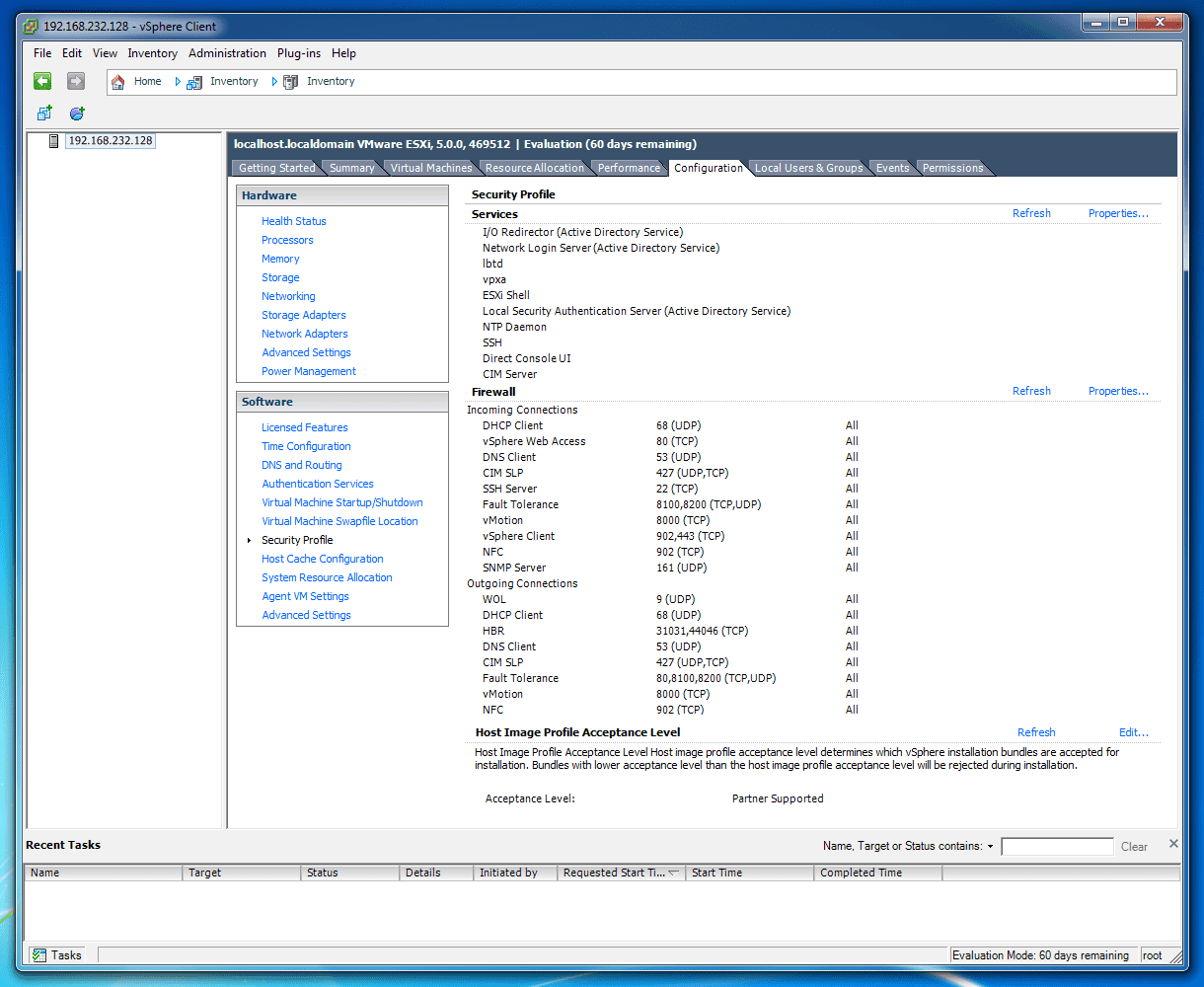
- Select the ESXi host in the configurations tab
- Select Security Profile

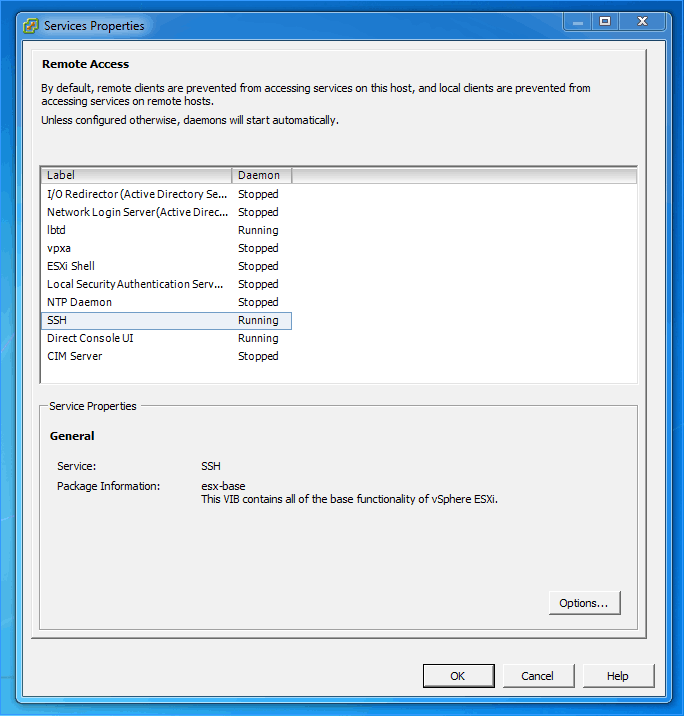
- Click on Properties in the upper right corner and you will get the a popup with all the services on this ESXi 5.0 hosts. Select the SSH service and press the Options button.

- Now you can start the services and set the startup options

- press okay and you are done..

If you are running Windows, you should also check out my blog post about how to install SSH on Windows 10 or SSH on Windows Server. I also blogged about how you can use SSH with PowerShell.
Tags: Enable SSH, Enable SSH on ESXi, ESXi, ESXi 5, ESXi 5.0, ESXi host, Host, Server, services, SSH, VMware, VMware vSphere, vSphere Client Last modified: January 12, 2019







Works perfectly! Thanks for the write up!
Hey, dont works for me.
I get the at putty the login prompt, but no password prompt.
some minutes later i get timeout error.
ssh aktivated and reboot…
Thank You Thomas!!! Can I buy you a beer?
I have been looking for this information all day.
It’s obvious once you know where it is ;-)
beer is always welcome ;)
This worked great. Thanks. Once I hit okay I have the yellow triangle with a ! in it. I beleiver this is a warning that SSH Support is enabled from what I have read so fare.
Thats right, VMware does not recommend to leave SSH enable because of security reasons
Hi, folks.
I receive the error “Connection refused” when I try to connect SSH. Someone can help me?
Thanks for the information, helped me get up to speed with some of the newer capabilities in 5.
Regarding the security issues around leaving SSH open, you can take a look at the firewall options (same screen) and limit SSH connections to only come from trusted sources (assuming you have static IP addresses of course). Changing this setting should also help with some of the connection issues above if it’s currently set to drop SSH traffic.
Also worth putting the same settings in place for you vSphere Client access etc. to reduce attack surface.
Sali Maurer
Viele Dank für de Artikel. Vilicht na als Ergänzig. Abstelle vom Warning ufem Host wo uftaucht: Configuration – Software – Advanced Settings – UserVars – UserVars.SuppressShellWarning = 1
Thanks Charly.
SSH and no warning at the same time.
use free ESXi 5.
for every restart of ESXi ssh is disabled.
Is there a way to make permanent ssh enabled at startup
thanks
This worked great. Thanks.
SSH enabled, PUTTY connection works OK. THANK YOU
Thanks a lot!
Thanks – solved my problem :-)
thanks man! it got me through. :)
Yes, it works if you have a vSphere lic, but what about those who don’t? The challenge of a “provided service” is no big deal, they gave it to you. Really, how difficult is it to click the “on” button, whew, it is terribly difficult, I’m sure. Try it without.
Yeah well: https://www.thomasmaurer.ch/2011/08/activate-ssh-on-vmware-esxi-5-0/
Thanks :)
tnx
thanks heaps!!! This helped me as well
Oops, no even vmware have this straightforward steps
NICE
Thanks worked perfectly.
Thank you for the concise and accurate instruction. Enabling ssh worked like a charm.
Thanks :D
Thank You!!!!!!!
Many thanks!
It works fine but now the screen is totally black. I tried the steps for restarting but I still have just a black screen. Please help me !!!
Thanks
This post is greatly helpful…thanks Thomacha…..nee poliyaada mwone
Thanks Thomas
you’re welcome :)