,

How to redirect sites to HTTPS in IIS 7.5

1–2 minutes
32 comments on How to redirect sites to HTTPS in IIS 7.5

This little guide shows you how you can redirect http request to the https website using IIS Settings. You can do the same on other versions of IIS slightly different.

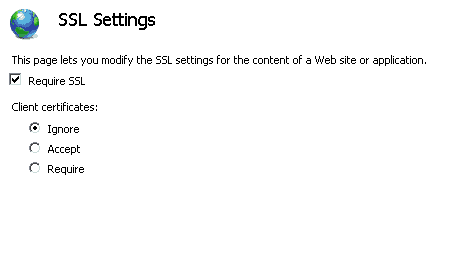
  1. First set “require SSL” under the SSL Settings from the Website
    SSL Settings
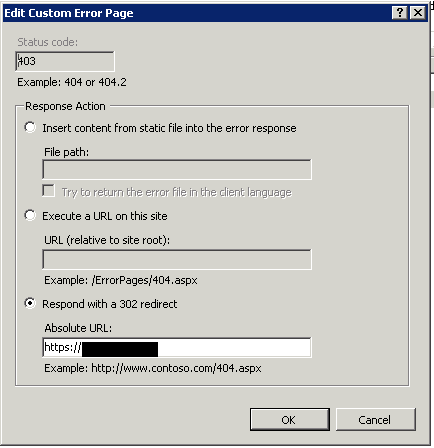
  2. Under the Error Page Settings edit the 403 Error Page
    Error Page Settings
  3. mark the Setting “Respond with a 302 redirect” and add the https URL
    Respond with a 302 redirect

32 responses

  1. steve Avatar

    This is such a great, simple solution to this cumbersome ISS problem. Thanks very much!

  2. steve Avatar

    Of course, rather than the space station, I was referring to MS IIS…

  3. Pawel Avatar
    Pawel

    Does not work in IIS 7.5 . Maybe in 7

    1. Thomas Maurer Avatar

      Did this on a lot of Win2k8 R2 Servers with IIS 7.5, never had a problem :)

  4. Pawel Avatar
    Pawel

    then maybe you can help me. I’m trying to direct to https://localhost as a test . It stays on the error page and doesnt go anywhere. Does it need to be an actual url ?

  5. Pawelw Avatar
    Pawelw

    I got this to work but the problem is if a website uses virtual directories they will redirect to the home page. Having an absolute redirect doesnt make much sense website.com/a website.com/b website.com/c all need to go to their respective redirect. With an absolute 302 redirect everything goes to website.com

    1. Thomas Maurer Avatar

      Maybe you can use the Redirect Feature. But you have to install this Feature first from the Server Manager. This makes it much easier :)

  6. Tom Cat Avatar
    Tom Cat

    This works for me on iis7.5 win 2008. Simple but so GREAT!!!! it saves me after hours struggling with java/html redirect coding. Thanks a lot Thomas!

  7. Michael Appel Avatar
    Michael Appel

    absolutely great! it works very well. ;)))

    after hours of trying with coding and other found “solutions”, this is the most easiest and working way. thank you very much!

    this result should be the first on google search. ;))))))

    best regards from germany
    michael

  8. inbanco Avatar
    inbanco

    got it working on iis7.5 and 2008R2 but had to edit the error page 403.4 and redirect that single page to https://blah.com
    that page is “SSL required – not authorized” btw

    thanks

  9. Todd Avatar

    Great advise. I really appreciate the info.

  10. Christian Avatar

    This was great, nice and easy in comparison to some other posts/methods I read, thank you.

    It worked perfectly outside my network but in my network I get the HTTP Error 403.4 – Forbidden
    page instead of it redirecting properly. https still works internally but the redirect does not. I work with some thick headed users and would like it to act the same internally and externally.

    Any thoughts would be greatly appreciated.

  11. Dan Avatar

    Does not work under 7.5 for me either. Here is what is returned. Have tried enabling anon authentication but still did not work.

    Most likely causes:
    – This website requires you to log in.

    What you can try:
    Go back to the previous page.

    More information

    This error (HTTP 403 Forbidden) means that Internet Explorer was able to connect to the website, but it does not have permission to view the webpage.

    For more information about HTTP errors, see Help.

  12. Archit Avatar

    This worked for me on iis7.5 and 2008R2. Such a simple and elegant solution.

    Thanks a lot!

  13. Pedro Paschuetto Avatar

    Thank you very much!

    Works fine at the Windows 2008 R2 Ent. with IIS 7.5.

    Regards!

  14. Elari Avatar

    Works well for Win Server 2012, IIS 8 too:)

    1. Thomas Maurer Avatar

      thanks for the information

  15. Nag Avatar

    i followed this and i got error saying this webpage has a redirect loop. how can i fix it?

  16. Abhay Avatar

    Wow..!!. It works like a charm. I was struggling with url rewrite and other coding stuffs .Nothing worked..But this is so simpe and worked like a magic….

    1. Thomas Maurer Avatar

      Great it helped you!

  17. David Avatar

    This works great. Thanks! For those that mentioned that it didn’t work etc. You may need to ensure that you have port 80 as part of your “Site Bindings” setting.

  18. Srini Avatar

    Thanks,it worked for us..

  19. Jeff Avatar

    Hello Thomas,

    I’ve tried your method which looks very helpful for my website but i get this error when i try to reach the website.

    “This webpage has a redirect loop”

    Did you have any similar problem in the past ? Any kind of solution ?

    Thanks in advance for help

    Take care

  20. Jason Alls Avatar

    Thank you for making redirects from HTTP to HTTP so easy with your excellent visual step-by-step tutorial.

  21. Oscar Nino Avatar
    Oscar Nino

    It’s a great and simple solution. It works! Thanks…

  22. brett Avatar

    Genius… nice and simple… worked a treat. Thanks VERY much

  23. Jesús Panateos Avatar
    Jesús Panateos

    Great post!!! Thank you!

    You can also config the redirect domain with or without www using URL rewrite. The SSL cert only include: www FQDN.

    web.config example:

    Extracted from: http://www.sysadmit.com/2017/05/windows-iis-redirigir-http-https.html

  24. Jerry Avatar

    It work in IIS 10 . Thanks

  25. Dave Avatar

    Great post! Simple and worked first try. Thanks!

  26. Thomas Avatar
    Thomas

    Well, I have been struggliing with this shit for years on a old server of ours never getting it to work with redirects, URL rewrites and so but then I stumble over your site and gave it a five minut reading and a 10 minuts config and now.. for the first time in ages it works like a charm! If ever in Stockholm, Sweden I´ll buy you lunch! Thanks Thomas

    1. Thomas Maurer Avatar

      Hi Thomas (great name by the way)
      Super happy that I could help.
      I will let you know ;)

  27. Thomas Avatar

    It´s a great name :)
    Well, I have a follow up question. When doing this above I get problems with redirecting subpages (www.coolwebname.se/subpage) since they redirect directly to the startpage (https://www.coolwebname.se) instead of redirecting to https://www.coolwebname.se/subpage. (Occurs when visitors write http://www.coolwebname.se/subpage instead of https://www.coolwebname.se/subpage in the browers.

    Any ideas?

    Have an awsome day! / Thomas

Leave a Reply

Your email address will not be published. Required fields are marked *

This site uses Akismet to reduce spam. Learn how your comment data is processed.