In VMware ESXi 4.0 you needed a small a trick to activated SSH on your Host. In VMware ESXi 4.1 its very easy to activate SSH.
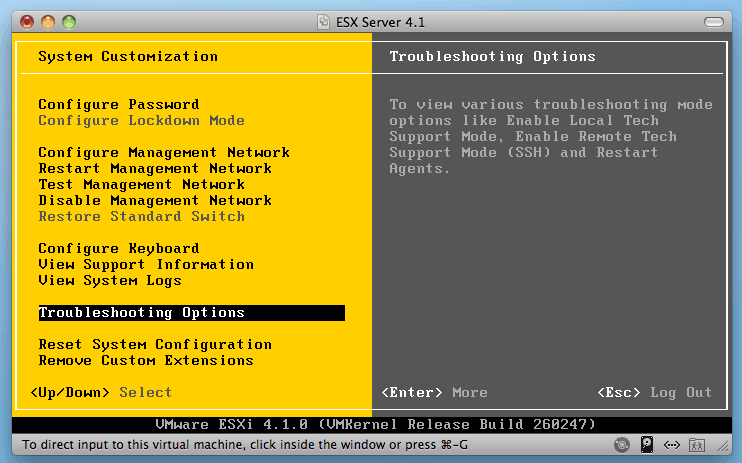
- Press F2 to Customize System Settings
Navigate to Troubleshooting Options

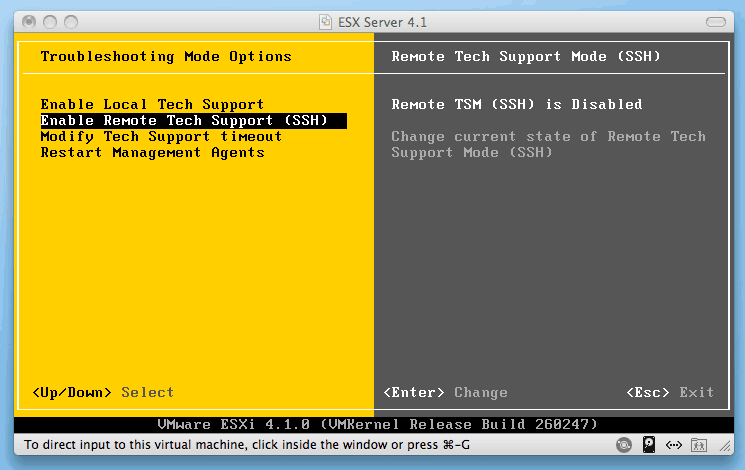
- Now you can enable Remote Tech Support (SSH)


And by the way, installing ESXi in VMware Fusion on my Mac is really awesome for presentation and testing.
Here is a link how you do this with VMware ESXi 4.0


Pingback: Enabling SSH access in ESXi | Ray Heffer
tq….
tq….
It’s also possible via the VI Client, see here.
Worked like a charm. Thx
Pingback: Activate SSH on ESXi 4.1 via vSphere Client | thomasmaurer.ch
Cool article. Thanks!
Thanks.
Pingback: VMware ESXi 4.0 / ESXi 4.1: enable SSH login for non-root users (and only them) « The Wiert Corner – irregular stream of Wiert stuff
Pingback: Suspend a machine and shutdown VMware ESX 4.1 in a hurry « Wayne Wright Tech Tips
Pingback: Activate SSH on VMware ESXi 5.0 | Thomas Maurer (tm)
This solved my problem.
Thanks
Pingback: Activate SSH on VMware ESXi 5.1 | Thomas Maurer (tm)
I’m extremely impressed with your writing skills and also with the layout on your blog. Is this a paid theme or did you modify it yourself? Anyway keep up the excellent quality writing, it is rare to see a nice blog like this one nowadays.