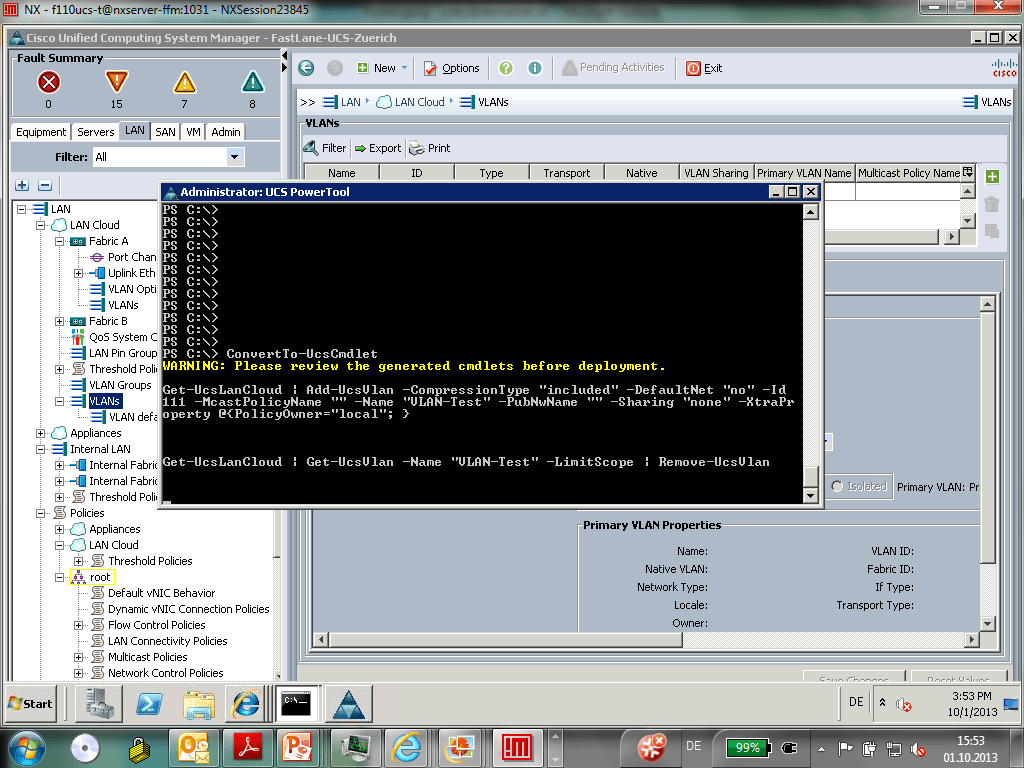
This week I had a chance to be part of a Cisco UCS course and the trainer Walter Dey (ex Cisco Distinguished Engineer) showed me a great feature in the Cisco UCS PowerShell Module called Cisco UCS PowerTools. The Convertto-UCSCmdlet allows you to record the things you do in the UCS Manager (GUI) and converts this into Windows PowerShell cmdlets.

To use this, this is pretty simple first install the UCS PowerTools and Connect to your UCS with the same user you connect to the UCS Manager. Checkout my blog post about the Cisco UCS PowerTools.
After that run the cmdlet:
Convertto-UCSCmdlet
After that open the UCS Manager session and do the steps you want to recored.
I have to say, this is just great feature included in the Cisco UCS PowerTools.