

To use the Logical Networks in System Center Virtual Machine Manager 2012 on a specific Hyper-V Host or Hyper-V Cluster you have to add the Logical Network to the network interface which the logical network is available. In the GUI you can do this in the properties of the Hyper-V host under Hardware.
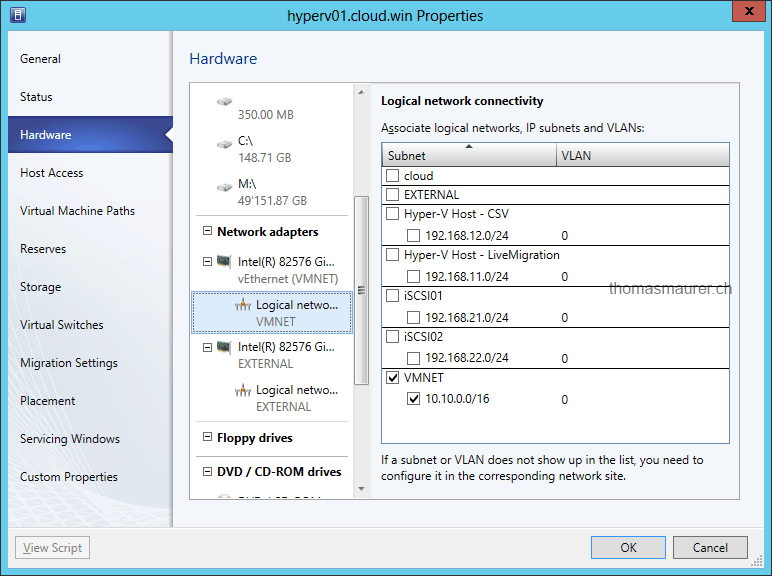
if you have a lot of Hyper-V hosts this can take some time. This Windows PowerShell script will help you. It will add the logical network on each Hyper-V host. It chooses the network adapter based on the network adapter name which is given on the Hyper-V host.
Import-Module virtualmachinemanager
$LogicalNetworkName = "LogicalNetwork"
$vmHostGroup = Get-VMHostGroup "HostGroupName"
$HostNetworkAdapterName = "Network Adapter Name"
$vmHosts = $vmHostGroup.AllChildHosts

foreach ($vmHost in $vmHosts) {

$guid = [guid]::NewGuid()
$logicalNetwork = Get-SCLogicalNetwork -Name $LogicalNetworkName
$vmHostNetworkAdapter = Get-SCVMHostNetworkAdapter -VMHost $vmHost | where-object {$_.ConnectionName -eq $HostNetworkAdapterName }

Set-SCVMHostNetworkAdapter -VMHostNetworkAdapter $vmHostNetworkAdapter -AddOrSetLogicalNetwork $logicalNetwork -JobGroup $guid
Set-SCVMHostNetworkAdapter -VMHostNetworkAdapter $vmHostNetworkAdapter -Description "" -JobGroup $guid -VLanMode "Trunk" -AvailableForPlacement $true -UsedForManagement $false

Set-SCVMHost -VMHost $vmHost -JobGroup $guid -RunAsynchronously

}
With the release of Service Pack 1 for System Center 2012 Virtual Machine Manager this is gone if you use the Logical Switch.
Tags: Host, Hyper-V, Logical Network, Microsoft, PowerShell, SCVMM, System Center, System Center 2012, Virtual Machine Manager, VMM Last modified: November 7, 2012








I did this in february :-) and also populating the VMM with new networks
http://vniklas.djungeln.se/2012/02/02/scvmm-2012-powershell-function-for-configure-network-on-hosts/
Keep up the good work Thomas!